Need for Speed AI: put your car or truck in the viral movie chase
Upload one photo of your car, pickup truck, SUV, or bike—and Need for Speed AI swaps your exact ride shot-for-shot into the viral small-town movie chase: cruising past traffic, spinning white-smoke burnouts in front of the restaurant patio, and tearing away with the trend’s original audio.
- 15-second video
- 9:16 vertical
- 720P HD
- Original trend audio
By tapping generate you confirm you have the right to upload this photo (and any adult shown agreed to it) and accept our Terms of Service.
Sunny small-town chase, white smoke & patio crowd.
- Works from 1 parked vehicle photo
- 15 s · 720P HD · 9:16 · original audio
- Auto credit-back if a render fails
- From $9.90 one-time · no subscription
Independent creative tool. Not affiliated with Electronic Arts (EA), Need for Speed, TikTok, or CapCut.
Scenes & real output
Watch the viral car scenes you can generate
Pick any scene in the generator above—upload one photo of your car or truck and AI swaps your ride into every frame with the original sound.
- Sunny small-town movie street scene
- Patio crowd watching from the railing
- Chase-car cuts, intersection burnout & getaway
- Original trend audio, synced in
- Starring the exact vehicle from your photo
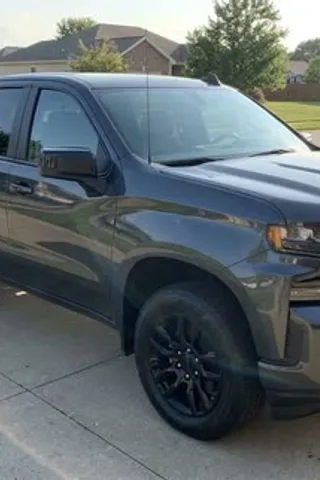
Movie Burnout
Generated on Need for Speed AI from the single parked photo in the corner. 720P vertical, unedited.
Intersection Drift
Red-light wet intersection sideways slide past the lens.
Night Speed-Ramp
Lit parking-lot gimbal whip-pans, wheel close-ups & spin.
How it works
Three steps from parked photo to street chase
From a parked driveway photo to a vertical 720P street-racing MP4 in about ten minutes.
- 1
Upload your car photo
Pick one sharp photo of your car, truck, motorcycle, or ride—ideally a front three-quarter angle in clear daylight or garage lighting.
- 2
AI renders the 15 s chase
Sign in with Google and tap Generate. Seedance rebuilds all seven shots—roll-in, chase cuts, intersection burnout, patio crowd, and getaway—with your vehicle in 720P HD.
- 3
Download & post to CarTok
Save your watermark-free 720P MP4 from My Videos and post to TikTok, Reels, or Shorts with engine audio or a drift-phonk beat.
On TikTok
How CarTok is running the Need for Speed AI trend
A few community takes on the meme. Tap any clip to watch.
Embedded directly from TikTok with creator credit. Clips belong to their creators and may use varied workflows.
Behind the trend
Why everyone is putting their car into Need for Speed AI
The trend started on November 11, 2026 when truck owner @lakenyoung posted "What did Ai do to my truck" on TikTok: an AI car-movie clip cruising down a sunny town street, spinning thick white tire-smoke burnouts past a restaurant patio, and driving off. Within 48 hours #needforspeedaitrend and #needforspeedaicar passed 330,000 views as "deleted scenes from Need for Speed".
Most basic app templates accidentally turn every pickup into the original red two-door coupe. Need for Speed AI uses a split-authority reference edit prompt so your vehicle keeps its own cab, bed, doors, paint color, lift, and wheels in every cut—from $9.90 one-time with no subscription.
Read the Need for Speed AI trend explainerStep-by-step: make yours from one photo- Soundtrack
- Original viral reel audio included
- First post
- @lakenyoung — "What did Ai do to my truck"
- Trend wave
- Exploded Nov 11–16, 2026
- AI workflow
- Shot-by-shot car swap from 1 photo
Why creators use it
Built for one viral car trend—and dialed in
General AI video studios take five prompt retries just to stop wheels from sliding backward. Need for Speed AI has the burnout, chase camera, neon lighting, and engine roar pre-engineered.
True to your actual ride
Your car’s body lines, paint finish, headlights, grille, and rims carry straight from your parked photo into every frame of the drift.
Zero prompt engineering
Burnout physics, low-angle tracking sweeps, wet-asphalt neon reflections, and pursuit lights are dialed in. Upload one photo and hit generate.
Full 15 s in 720P HD
Every render is the complete 15-second burnout, patio-crowd, and getaway sequence in crisp 720P HD with the original trend audio.
Failed renders cost $0
If an upstream render fails, times out, or hits a filter, your video credit returns to your balance automatically.
Renders in the background
Cloud GPUs handle the heavy lifting. Close the browser tab if you want—your finished street-racing clip waits in My Videos.
Private garage storage
Your car photos and MP4s stay private to your account—never shared publicly, never used for AI training, and deletable in one click.
Your options
Need for Speed AI vs other options
Three ways to join the viral AI street-racing car trend, compared side by side.
| Feature | Need for Speed AI | Other NFS AI sites | CapCut templates |
|---|---|---|---|
| Cost per 720P street-racing video | $6.99 – $9.90 (no sub) | $14.99 – $29.99 | Free (needs rolling clips) |
| Works from 1 parked photo (no prompt) | |||
| Auto credit-back if a render fails | Varies | ||
| Purchased videos never expire | Monthly reset on subscriptions | ||
| Watermark-free MP4 with engine audio | Static zoom or CapCut outro |
Competitor pricing reflects public single-pack or subscription tiers in November 2026 and may change. CapCut templates require pre-filmed clips for real motion.
Get it right first time
How to pick the best car photo (and AI limits)
Your single photo is the blueprint for every frame of the drift. A quick check before uploading gives you crisp rims and accurate body lines on the first try.
Do
- Shoot one vehicle from a front three-quarter corner angle
- Keep bumpers, roof, and wheels completely inside the frame
- Use clean daylight, overcast sky, or bright garage light
- Upload your own ride, or an adult portrait with permission
Avoid
- Trash cans, poles, or people blocking the hood and wheels
- Crowded car-meet rows with overlapping vehicles
- Pitch-black night shots where wheel arches disappear
- Heavy color filters, minors, or non-consensual portraits
Generative AI video is synthetic computer imagery, not real street footage: fine badge lettering or spoke counts can shift slightly during high-speed motion blur. Label clips as AI-generated when posting and keep real driving safe on the track.
Pricing
Pay per video—no subscription
One-time video packs with zero recurring subscriptions. Every render is 720P HD with roaring engine audio, and failed renders return to your balance automatically.
Single
Test the street-racing trend on your ride.
$9.90one-time
1 videos × 15 s · $9.90 each
- Vertical 720P HD
- 15-second Need for Speed AI video
- Synchronized engine & drift audio
- Clean MP4, no watermark
- Never expires
- Credited back if a render fails
Trio
Save 16%Run your daily driver, dream build & a funny ride.
$24.90one-time
3 videos × 15 s · $8.30 each
- Vertical 720P HD
- 15-second Need for Speed AI video
- Synchronized engine & drift audio
- Clean MP4, no watermark
- Never expires
- Credited back if a render fails
Crew
Save 29%For car clubs, detailers, pages & creators.
$69.90one-time
10 videos × 15 s · $6.99 each
- Vertical 720P HD
- 15-second Need for Speed AI video
- Synchronized engine & drift audio
- Clean MP4, no watermark
- Never expires
- Credited back if a render fails
Paid once through Stripe. Unused videos stay in your balance with no expiry date, and a failed render is credited back straight away.
CarTok playbook
Need for Speed AI guides
Photography angles, TikTok phonk audio tips, funny ride ideas, CapCut comparisons, and transparent pricing.
How to Photograph Your Car for Need for Speed AI (Angles & Lighting)
Get accurate rims, headlights, and body lines on your first render: why front three-quarter car photos win and five common mistakes to avoid.
Read guideComparing Need for Speed AI Video Generators in 2026
Side-by-side comparison of Need for Speed AI tools on price per video, subscriptions, video length, audio, and truck-shape preservation.
Read guide12 Wild & Funny Rides People Put Into Need for Speed AI
Supercars look slick, but minivans, lawnmowers, rusty sedans, and pets get the comments. Twelve creative upload ideas for your next Need for Speed AI clip.
Read guideHow to Make a Need for Speed AI Video From One Car Photo
Turn a parked driveway or parking-lot car photo into a 15-second 720P viral car-movie burnout and getaway clip in three simple steps—no prompts or editing.
Read guideNeed for Speed AI Pricing: Why HD AI Car Videos Cost Credits
Why 15-second 720P generative car-swap clips aren't free, what each Need for Speed AI video pack costs, and how automatic credit-backs work.
Read guideThe Need for Speed AI Prompt vs One-Tap Car Swap
Why short Kling/CapCut prompts turn pickups into the red two-door movie car—and how split-authority reference prompts keep your actual truck or sedan.
Read guideFAQ
Need for Speed AI questions & answers
Need for Speed AI swaps a single photo of your car, pickup truck, SUV, van, or bike shot-for-shot into the viral 15-second small-town car-movie chase—complete with chase-car cuts, white-smoke intersection burnouts, restaurant patio onlookers, and the trend’s original audio, with zero prompts to write.
It is the viral CarTok and Reels format where creators take an ordinary driveway or parking-lot photo of their car and drop it into a hyper-realistic midnight street-racing burnout and pursuit sequence inspired by classic 2000s arcade tuner games.
Upload one clear daylight front-corner photo of your vehicle, sign in with Google, and tap Generate my Need for Speed AI video. Your downloadable 15-second 720P MP4 lands in My Videos in roughly 5–15 minutes.
Yes. Every 15-second 720P video runs on dedicated cloud GPUs via a paid multimodal AI video model, so there is no free tier. Single videos are $9.90—down to $6.99 per video in packs—as a one-time payment with no subscription. Failed renders are credited back automatically.
Typically 5 to 10 minutes depending on GPU queue load. Rendering runs on our servers, so you can close the tab and grab your finished MP4 from My Videos whenever you come back.
Yes. Every video includes synchronized engine revs, exhaust pops, and tire-screech sound effects. When posting to TikTok or Reels, you can keep the raw engine sound or layer a trending drift-phonk track on top.
CapCut photo templates only shake and zoom a flat still image unless you already filmed real rolling highway shots. Need for Speed AI synthesizes actual spinning tires, billowing burnout smoke, dynamic chase-cam motion, and wet neon street reflections from one parked photo.
Any car, truck, SUV, JDM tuner, muscle car, minivan, motorcycle, tractor, or scooter—plus adult portraits or pets if you want the AI to put them behind the wheel of a matte-black street coupe. Do not upload photos showing minors or people who have not consented.
A sharp daytime or well-lit garage photo showing the entire vehicle from a front three-quarter angle (about 35–45 degrees off the front bumper) with all wheels visible and nothing blocking the bodywork.
Any failed, timed-out, or safety-blocked render is credited back to your balance automatically. If a render completes with warped wheels or guessed trim, shooting a cleaner front-corner photo in brighter light gives the AI much stronger geometry.
No. Need for Speed AI is an independent creative tool built for the social-media video aesthetic. It is not affiliated with, endorsed by, or connected to Electronic Arts (EA), Criterion Games, the Need for Speed franchise, car manufacturers, TikTok, CapCut, or Instagram.
Only you. Your uploaded photos and generated MP4s live privately in your account, are never published, sold, or used to train AI models, and can be permanently deleted from My Videos at any time.
No—neither TikTok nor Instagram includes a built-in generative street-racing filter that animates parked cars into 3D drifts. Viral clips are generated with external AI video tools like Need for Speed AI.
Stick to a photo featuring one clear primary vehicle. When multiple cars overlap in a crowded parking lot or car meet, the AI may animate the wrong car or blend body panels together.
Yes! Daily drivers, rusty 2004 sedans, family minivans, work vans, riding lawnmowers, and farm tractors often get way more views and comments on TikTok than supercars because the contrast with a midnight police chase is hilarious.
Need for Speed AI locks onto your uploaded photo to carry your vehicle’s body shape, paint color, headlights, grille, and wheel design through the burnout and drift. Sharp, evenly lit front-corner photos preserve details best.
Yes. If you upload a clear portrait of yourself (an adult) or your dog or cat without a car, the AI places them behind the wheel of a tuned matte-black widebody street coupe launching into the midnight drift.
Failed or blocked renders return to your balance automatically. Completed renders cannot be auto-refunded since GPU generation has already run, but any completely unused video pack can be refunded in full within 7 days of purchase.
You receive a clean H.264 MP4 video at 720×1280 (720P HD, vertical 9:16 with cinema bars), 15 seconds long, with the original trend audio and zero watermarks—ready for TikTok, Reels, and YouTube Shorts.
Put your ride on the midnight grid
Upload one photo of your car, truck, bike, or ride now and get a 720P midnight street-racing MP4 in minutes—no prompts, no subscription.
Generate my car video